

If you want real 1080p gaming without spending a fortune, the Acer Nitro 5 keeps showing up for a reason. It is not a thin lifestyle laptop pretending to be a gaming machine. It is built around one simple goal, give you a dedicated GPU and a fast Full HD screen at a price most people can still afford.
But here is the part many buyers miss.
The name Acer Nitro 5 alone means nothing. The configuration decides everything.
This updated guide shows you exactly which Acer Nitro 5 versions are worth buying, which ones to avoid, and how to get the best value for smooth 1080p gaming.
Why the Acer Nitro 5 Still Works for Budget 1080p Gaming
The Nitro 5 works because it focuses on performance basics instead of premium design.
- Dedicated NVIDIA RTX graphics, not integrated graphics
- Full HD resolution that matches GPU power
- 144Hz displays on most gaming configs
- Upgrade options for RAM and storage in many models
This makes it a solid choice for students, first-time PC gamers, and anyone who wants smooth gameplay without paying flagship prices.


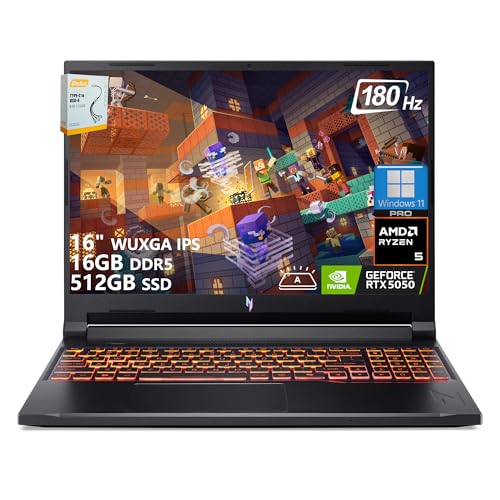
What Actually Matters in the Specs
Ignore marketing buzzwords. Focus on these three things.
1. GPU, the single most important part
The GPU determines your frame rates, settings, and how long the laptop stays relevant.
- RTX 3050 or 3050 Ti, entry-level 1080p gaming
- RTX 4050, best balance of power and efficiency
- RTX 4060, excellent 1080p performance if priced right
If a listing does not clearly state the GPU model, skip it.
2. CPU, good enough is good enough
Most Nitro 5 laptops use Intel Core i5 or i7, or AMD Ryzen 5 or 7 CPUs. For 1080p gaming, these are more than enough. The GPU does the heavy work.
3. RAM and storage, plan ahead
Many Nitro 5 models ship with 8GB RAM. This works, but 16GB feels much smoother, especially in modern games. The good news is that many Nitro 5 versions allow easy RAM and SSD upgrades later.
Best Acer Nitro 5 Configurations for 1080p Gaming
This section is the most important part of the article.
Best Entry-Level Choice, Tight Budget
Acer Nitro 5 with RTX 3050 or RTX 3050 Ti
Who it is for
Casual gamers, students, first gaming laptop buyers.
Recommended minimum specs
- GPU: RTX 3050 or RTX 3050 Ti
- CPU: Intel i5 (12th gen or newer) or Ryzen 5
- RAM: 16GB, or 8GB with a clear upgrade plan
- Storage: 512GB SSD
- Display: 1080p, 144Hz
What to expect
- Esports games on High settings
- AAA games on Medium to High at 1080p
- Stable performance with realistic settings
When to skip it
If the price is close to an RTX 4050 model, do not buy this version.
Best Value for Most People, The Sweet Spot
Acer Nitro 5 with RTX 4050
Who it is for
Most gamers who want good performance now and some future-proofing.
Recommended specs
- GPU: RTX 4050
- CPU: Intel i5 or i7, or Ryzen 7
- RAM: 16GB
- Storage: 512GB or 1TB SSD
- Display: 1080p, 144Hz
What to expect
- High to Ultra settings at 1080p
- Better frame stability than RTX 3050 models
- Strong performance for several years
Why this is the best choice
The RTX 4050 is a clear step up in efficiency and power. For most buyers, this is the Nitro 5 configuration that makes the most sense.
Best Performance Pick, Only If the Price Is Right
Acer Nitro 5 with RTX 4060
Who it is for
AAA gamers and users who want maximum 1080p performance.
Recommended specs
- GPU: RTX 4060
- CPU: Intel i7 or Ryzen 7
- RAM: 16GB, 32GB optional
- Storage: 1TB SSD
- Display: 1080p, 144Hz
What to expect
- Ultra settings at 1080p
- Excellent frame consistency
- Strong long-term value if discounted
When it is not worth it
If it costs much more than the RTX 4050 version, skip it. The value gap grows fast.


Configurations You Should Avoid
Avoid these, even if the price looks tempting:
- Listings without a clearly named RTX GPU
- 60Hz display models
- Full-price models with only 8GB RAM
- “Gaming” Nitro 5 listings without RTX branding
Most bad experiences come from buying the wrong configuration.
Real User Feedback, The Honest Picture
What users like
- Strong price-to-performance ratio
- Smooth 1080p gaming with the right GPU
- Upgrade options for RAM and SSD
- Reliable performance for the money
Common complaints
- Fan noise under load
- Average battery life
- Display colors are fine, not premium
- Too many confusing variants
Pros and Cons Summary
Pros
- Real 1080p gaming on a budget
- Dedicated RTX graphics options
- 144Hz Full HD display on many models
- Upgrade-friendly design
Cons
- Loud fans during gaming
- Battery life is not a highlight
- Screen quality is gaming-focused, not creator-grade
- Easy to buy the wrong configuration
Frequently Asked Questions About the Acer Nitro 5
Can the Acer Nitro 5 really handle modern games at 1080p?
Yes. Acer Nitro 5 models with RTX 3050, RTX 4050, or RTX 4060 GPUs are designed to support modern games at 1080p. The exact settings depend on the GPU tier and the game, but smooth gameplay is realistic with sensible graphics settings.
Which Acer Nitro 5 configuration should I avoid?
Avoid listings that do not clearly state the RTX GPU model, come with only 8GB RAM at full price, or use vague terms like “gaming graphics” without proper specifications.
Is the 144Hz display on the Acer Nitro 5 actually useful?
Yes. A 144Hz display makes gameplay feel noticeably smoother, especially in fast-paced shooters and action games. Even when FPS drops below 144, motion still feels smoother than on a 60Hz panel.
Final Verdict
If your goal is real 1080p gaming without overspending, the Acer Nitro 5 is still a smart choice when configured correctly.
The RTX 4050 version is the best option for most people, the RTX 3050 works if it is clearly cheaper, and the RTX 4060 only makes sense if the price jump is reasonable.
Choose carefully, check the specs twice, and you will get strong gaming performance from a laptop made by Acer that focuses on what matters most, performance for the price.
Putting together an affordable gaming setup? Take a look at our SANSUI 27-inch gaming monitor review for an external display option, and our SteelSeries Apex 3 TKL keyboard review for a compact desk accessory.


Disclosure: This post contains affiliate links. If you make a purchase through these links, I may earn a small commission at no extra cost to you.
